Courier Self Billing Software
Self-billing software for same-day courier firms
Pay subcontractor drivers from one controlled self-bill each period, instead of chasing forty invoices in forty formats.
Qinetic builds each driver's self-bill invoice from their agreed rate and the days or jobs they worked, applies agreed additions and deductions, and keeps the final PDF for the office and the driver. On Pro, you then pay drivers directly from Qinetic.
Rather talk it through? Request a callback
Self-billing is included in Core at £5 per active driver per month · No credit card
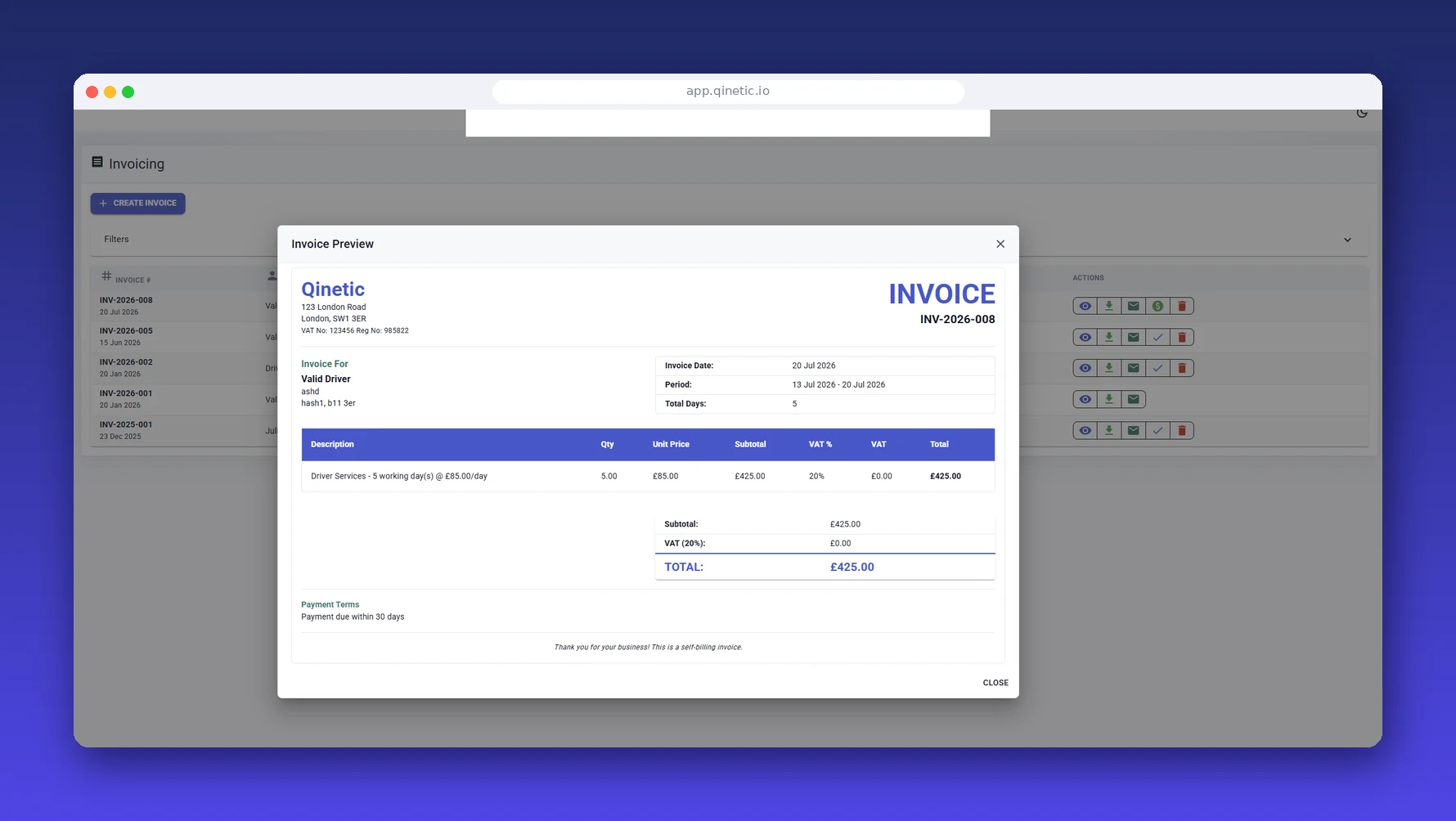
Controlled driver self-billing
Build, review and retain self-bill invoices with clear rates, additions, deductions and approved expenses.
The Friday pay run problem
Most same-day courier firms run on owner drivers and subcontractors. That keeps the operation flexible, but it turns every pay run into a reconciliation job. Days worked sit in one place, agreed rates sit in a spreadsheet or someone's head, fuel and parking receipts arrive as photos in a chat, and a PCN that needs recharging is in another inbox entirely.
Then each driver sends their own invoice, in their own format, with their own maths. Some forget VAT. Some invoice for a day they were stood down. The office checks every line by hand, and when a driver disputes their pay there is rarely one record that shows how the number was reached.
Self-billing fixes the direction of the problem. You raise the invoice on the driver's behalf from the work you already hold, under an agreement you both signed. Qinetic is the system that makes that repeatable every week.
How courier self-billing works in Qinetic
Days and jobs become invoices. Invoices become payments.
Set the agreed rate
Each driver has a rate card on their record: a daily rate or a job-based rate, whatever you agreed when they started.
Review the period
Billable days are worked out from the driver's availability for the period. Check them, then add agreed additions or deductions such as an approved PCN recharge.
Approve the self-bill
Preview every driver's invoice line by line, include approved expenses, and finalise. Qinetic keeps the PDF and emails the driver their copy.
Pay the driver
On Pro, pay approved self-bills directly from Qinetic instead of keying each payment into online banking. On Core, pay drivers the way you do today.
Pro · Job import
Jobs already recorded in CX or another system?
Upload the CSV or Excel export instead. Qinetic matches each job to a driver, works out deductions and VAT, and builds one self-billing invoice per driver for you to approve and pay.
What's included
Driver rate cards
Keep the agreed daily or job-based rate attached to the driver, so the self-bill always starts from what was agreed.
Clear invoice lines
Each invoice shows the days or jobs, the rate and every adjustment, not an unexplained total.
Additions and deductions
Apply bonuses, agreed recharges and other adjustments openly before the invoice is finalised.
Approved expenses (Pro)
On Pro, fuel, parking and other receipts that have passed approval can be added to the right driver's self-bill.
VAT handled properly
VAT-registered subcontractors get self-bills that follow HMRC's self-billing rules. Non-registered drivers are self-billed without VAT.
Driver visibility
Drivers see their final invoices and payment history in the Qinetic app, which cuts down on "what was I paid for?" calls.
PDF and email record
Every finalised self-bill is stored as a PDF against the driver and emailed to them for their records.
Works with own vans
No trackers or black boxes to fit, so it works for subcontractors in their own vehicles.
Same record as compliance
The driver you self-bill is the same record that holds their licence, right to work, insurance and vehicle checks.
What HMRC expects from a courier self-billing arrangement
Self-billing for VAT is a formal arrangement set out in HMRC's VAT Notice 700/62. The short version for courier operators:
- •You need a signed self-billing agreement with each VAT-registered driver before you self-bill them, and it needs a review or expiry date, usually 12 months.
- •Each self-billed invoice must show the driver's name, address and VAT number, and the statement "The VAT shown is your output tax due to HMRC".
- •If a driver changes VAT number or deregisters, your invoices have to change with them. Knowing each driver's current status matters more than the status they had when they signed.
Qinetic produces the invoice in the right form. The agreement itself is between you and your driver, so check your arrangements with your accountant. Our guide to HMRC self-billing for courier companies covers the detail and the mistakes that catch operators out.
Core and Pro
Self-billing is part of Core, not an add-on. Pro adds direct driver payments and the wider finance workflow.
Core · £5 per active driver / month
- ✓ Driver rate cards and self-bill invoices
- ✓ Additions and deductions, applied before finalising
- ✓ Driver app access to invoices and payment history
- ✓ Driver compliance, right to work and vehicle records
Pro · £8 per active driver / month
- ✓ Everything in Core
- ✓ Pay drivers directly from approved self-bills
- ✓ Driver receipts and expenses added to self-bills, plus supplier payables
- ✓ Team Inbox for driver-to-office chat, plus FineWatch for PCNs
FAQs
Does Qinetic support HMRC self-billing rules?
Yes. Self-billed invoices are generated to support standard HMRC self-billing arrangements with VAT-registered subcontractors, and drivers who aren't VAT-registered are self-billed without VAT.
Can we pay drivers per day and per job?
Yes. Each driver's rate card holds the rate you agreed with them, whether that's a daily rate or a job-based rate.
Can we recharge a PCN to a subcontractor driver?
You can apply an agreed deduction, such as a PCN recharge, to the driver's self-bill before it's finalised, so the driver sees it on the invoice rather than finding it in their bank balance. Whether you can recharge depends on your contract with the driver. Our PCN recharge guide explains the issues.
Can drivers see their statements?
Yes. Drivers see their final invoices and payment history in the Qinetic app and receive a PDF copy by email.
Can an approved expense be reimbursed?
Yes, on Pro. An approved driver expense can be added to the relevant self-bill and is then tracked through to payment.
Does Qinetic replace our dispatch or accounting system?
No. Keep the tools that book and dispatch your work, and keep your accounting software. Qinetic runs the driver side alongside them: compliance, vehicles, self-billing and driver pay.
How much does it cost?
Self-billing is included in Core at £5 per active driver per month. Pro, which adds direct driver payments, is £8. You can try either free for 14 days without a card.
Stop rebuilding driver pay in spreadsheets
Set up your drivers and rates, run a self-bill for last week, and see the difference. Free for 14 days.
Start free trial Book a demo