Job and booking updates
Match or create the client, keep the booking history current, connect the driver and apply the configured organisation or driver margin — so the job that gets invoiced is the job that actually happened.
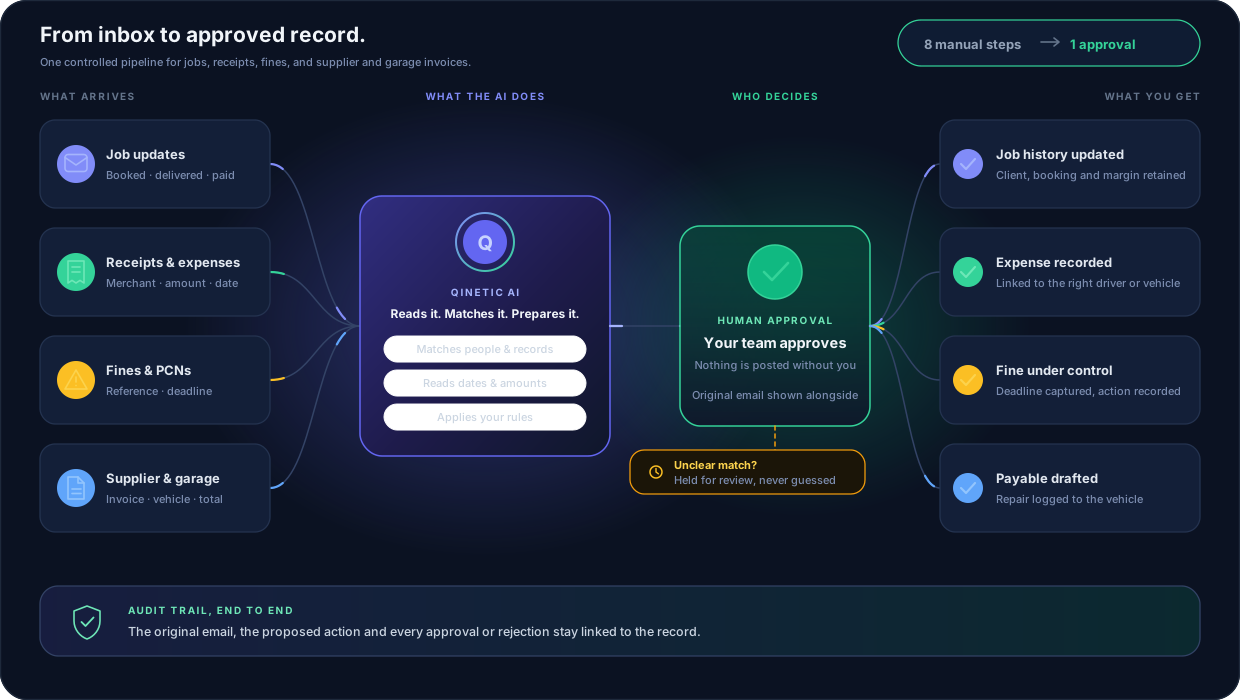
Open it. Download the attachment. Find the client. Match the driver. Copy the amounts. Work out the margin. Create the record. File the evidence. Somebody in your office does that, all day, for every supplier invoice, garage bill, receipt, booking update and PCN that lands.
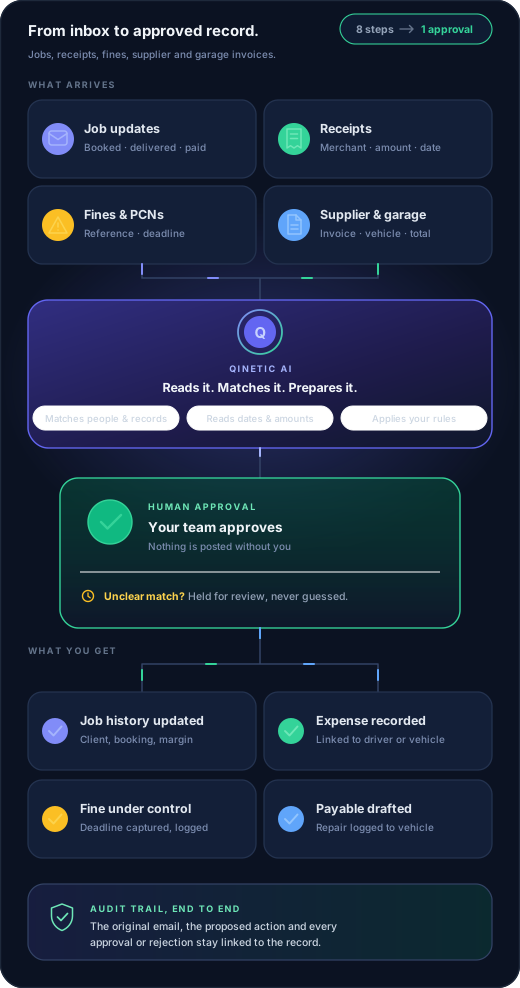
Qinetic does the first seven. Your team does the eighth: approve.
One pipeline. Four kinds of email in, four finished records out, one approval in the middle.
The cost nobody puts on a spreadsheet
Nobody logs this time. It disappears into the day, five minutes at a stretch, and it never shows up as a line item. But if it takes five minutes to turn one email into a correct record, and forty of them land each day, that is more than sixteen hours a week — most of a full-time role, spent retyping information that already arrived in writing.
Then there is the cost of the ones that get missed. A PCN that quietly passes its discount window. A supplier invoice paid twice. A margin that never made it onto the job. Those are not admin problems. Those are money.
Put your own numbers to it in a demoOne email, by hand
8 stepsWith Qinetic, steps 1–7 are already done.Your team opens one screen and decides yes or no.
Four inboxes worth of admin, one pipeline
Your team should not have to rebuild the same information across email, spreadsheets, folders and finance screens.
Match or create the client, keep the booking history current, connect the driver and apply the configured organisation or driver margin — so the job that gets invoiced is the job that actually happened.
Capture the merchant, date, amount and category, link the cost to the right driver or vehicle, and send it through the expense approval workflow you already use.
Identify the reference, amount and deadline, connect the driver and vehicle, and hand the notice to FineWatch to track the deadline and responsibility, then record the recharge or payment outcome.
Match or create the supplier or garage, check for duplicates, prepare the payable and keep the original invoice attached for approval. A repair or service bill also lands against the vehicle it was for, so the cost sits in that vehicle’s history instead of only in the accounts.
Speed you can actually sign off
The reason most operators will not let AI near their finance records is a fair one: they cannot see what it did or why. Qinetic keeps the original email on screen next to the action it is proposing, so you can check the reading against the source before you accept it. Nothing is posted, paid or invoiced because a model felt confident.
When a driver, customer, supplier or booking cannot be matched safely, it stops and waits for a person. Guessing is the one thing it will not do.
AI-assisted, not AI-only. The AI does the grunt work; your team approves.
Original email
Please find the attached invoice for two front tyres and tracking on MJ19 KLT.
Ready to record
Where the time goes back
Overnight email is already read, matched and prepared. The office starts the day reviewing, not retyping.
Amounts come off the document itself, not off somebody's memory at 4pm on a Friday. The rate you agreed is the rate that gets billed.
A PCN with fourteen days on it is a dated task the moment it arrives — not an attachment somebody meant to come back to.
Email automation is the front door. Once the record exists, the rest of the loop is already built: invoicing, self billing and driver payments run off the same records your team just approved.
Questions operators ask
No. Qinetic prepares and matches the information; your team approves the resulting action. Supplier payables and expenses keep their own financial approval steps on top of that.
No. Qinetic uses AI for reading and matching — pulling the supplier, vehicle, reference, dates and amounts off the document and finding the records they belong to. The decision to create, post or pay anything is a person’s, every time. AI-assisted, not AI-only.
It is held in the Document Queue for review. Qinetic does not silently guess when a driver, customer, supplier or booking cannot be matched safely — an item waiting for a person is the correct outcome, not a failure.
It depends entirely on your volume, so we will not quote you a number we made up. The honest way to size it is to count the operational emails your office handles in a week and multiply by the time it takes to turn one into a correct record. We will walk through that with your own figures on a demo.
No. Email automation builds compliance, vehicle and financial records from evidence you have received. Driver assignment and live job management stay in your existing workflow.
Qinetic connects supported email inboxes through a secure administrator setup. There is no migration and nothing for the office to learn — the email arrives where it always did. We will confirm the available connection for your organisation during onboarding.
Available with Qinetic Pro
Bring a week of your own operational email to a demo and we will show you exactly what Qinetic would have prepared, and what your team would still have decided.